Master the Effective Webinar Note-Taking Process for Success


Over half of American professionals report forgetting key points from online meetings and webinars within a week. With the surge in virtual events, effective note-taking has become a vital skill for anyone hoping to get lasting value from digital learning. This guide demystifies the best strategies and tools for capturing actionable insights during webinars, helping you turn fleeting online sessions into concrete, recallable knowledge.
Table of Contents
- Step 1: Set Up Your Optimal Webinar Note-Taking Tools
- Step 2: Define Key Objectives and Focus Areas
- Step 3: Apply Active Listening and Real-Time Summarization
- Step 4: Highlight and Organize Crucial Insights Efficiently
- Step 5: Review and Refine Your Webinar Notes for Clarity
Quick Summary
| Key Point | Explanation |
|---|---|
| 1. Choose the Right Note-Taking Tool | Select a versatile application like Microsoft OneNote or Evernote for effective note-taking during webinars. |
| 2. Define Objectives Beforehand | Review webinar materials to outline key topics, focusing on essential concepts and details for better engagement. |
| 3. Practice Active Listening | Maintain focus during the webinar, summarizing key points in your own words to enhance retention and understanding. |
| 4. Utilize a Color-Coded System | Implement a highlighting strategy using colors to categorize types of information for quicker reference. |
| 5. Regularly Review and Refine Notes | Dedicate time to review notes within 24 hours, clarifying unclear sections and adding reflections for deeper learning. |
Step 1: Set Up Your Optimal Webinar Note-Taking Tools
Successful webinar note-taking starts with selecting the right digital tools that match your learning style and technical comfort level. Digital note-taking technologies offer powerful ways to capture, organize, and review information efficiently during live online sessions.
Start by choosing a versatile note-taking application like Microsoft OneNote, Evernote, or Notion. These platforms provide robust features including rich text formatting, multimedia integration, and synchronization across devices. Look for tools that allow you to create separate notebooks for different webinars, use tags for quick categorization, and support quick typing or handwriting depending on your preference. Some applications even offer split screen capabilities, letting you take notes alongside the webinar window without constant switching.
Prepare your digital workspace before the webinar begins by creating a new notebook or document specifically for that session. Organize your template with sections for key categories like main points, questions, action items, and additional resources. This structured approach transforms random notes into a coherent knowledge repository you can easily reference later.
Pro tip: Test your chosen note-taking tool with a practice webinar or recording to familiarize yourself with its features and create a personalized note-taking workflow that feels natural and efficient.
Here’s a quick comparison of popular digital note-taking tools for webinars:
| Application | Usability Features | Device Synchronization | Unique Benefit |
|---|---|---|---|
| Microsoft OneNote | User-friendly, flexible | Windows, Mac, Mobile | Deep Microsoft integration |
| Evernote | Web clipper, rich search | Windows, Mac, Mobile | Extensive tagging system |
| Notion | Customizable templates | Windows, Mac, Mobile | All-in-one workspace design |
Step 2: Define Key Objectives and Focus Areas
Effective webinar note-taking requires a strategic approach to capturing the most valuable information. Understanding how to identify and outline the primary concepts and supporting details will transform your note-taking from passive listening to active learning.
Before the webinar begins, review any available materials like agenda, presentation slides, or course descriptions to preview potential key topics. During the session, pay close attention to the instructor’s language and emphasis. Experienced learners recognize that speakers often signal important points through vocal tone, repetition, and explicit statements like “this is critical” or “remember this point.” Create a simple annotation system with symbols or highlights that distinguish main concepts from supporting details. Use asterisks for critical points, question marks for areas needing further research, and brackets for potential action items.
Develop a flexible note-taking framework that allows you to capture information dynamically. Start with broad category headings such as background, key principles, case studies, and practical applications. Leave ample white space between sections to add supplemental notes or clarify points later. This approach helps transform scattered information into a coherent narrative you can easily review and understand.
Pro tip: Create a quick reference legend for your note-taking symbols before the webinar starts, ensuring you can quickly and consistently mark important information without disrupting your concentration.
This summary table helps clarify common note annotation symbols and their purposes:
| Symbol | Purpose | Example Usage |
|---|---|---|
| * | Denote critical concept | *Main idea: Webinar objectives |
| ? | Mark for follow-up or clarification | ?Unclear point about statistics |
| [ ] | Note potential action item | [ ] Review additional resources |
Step 3: Apply Active Listening and Real-Time Summarization
Transforming webinar attendance from passive watching to active learning requires strategic engagement and immediate information processing. Effective active listening techniques can dramatically improve your comprehension and note retention, turning each session into a powerful learning opportunity.
During the webinar, practice intentional listening by maintaining visual focus on the presentation and using physical cues like occasional nodding to demonstrate engagement. Create real-time summaries by quickly translating the speaker’s key points into your own words immediately after they are presented. This technique helps solidify your understanding and creates a personal narrative around the information. Explore using graphic representations to chart out complex ideas, connecting concepts with lines and visual diagrams that make abstract information more concrete and easier to remember.
Develop a quick summarization rhythm where you pause briefly after each major section to condense the main points into concise sentences. This approach prevents information overload and helps you actively process the content rather than passively absorbing it. Use shorthand, symbols, and abbreviations to capture information rapidly, focusing on capturing core ideas and their relationships rather than transcribing every single word.
Pro tip: Set a personal challenge to summarize each webinar section in three sentences or less, forcing yourself to distill complex information into its most essential components.
Step 4: Highlight and Organize Crucial Insights Efficiently
Transforming raw webinar information into a structured knowledge base requires strategic highlighting and organization techniques. Advanced annotation strategies can dramatically improve your ability to capture and retain critical insights, turning scattered information into a valuable resource.

Technology-driven note-taking approaches help professionals systematically organize lecture content with remarkable precision. Develop a color-coded highlighting system that assigns specific colors to different types of information meaning yellow for key concepts, green for examples, blue for supporting details, and pink for potential follow-up questions. This visual mapping allows your brain to quickly categorize and understand complex information. When annotating digital presentations, leverage PDF annotation tools that enable direct markup, allowing you to add comments, draw connections between ideas, and create visual links that make your notes more dynamic and interconnected.
Create a consistent organizational framework that transforms your notes from a random collection of facts into a coherent knowledge system. After each webinar section, take two minutes to review your highlights, consolidate key points, and write a brief summary that connects the main ideas. Use a standardized template that includes sections for main takeaways, questions raised, potential applications, and action items. This approach ensures that your notes are not just a record of information but a living document that can guide future learning and implementation.
Pro tip: Develop a personal shorthand notation system that allows you to capture complex ideas quickly, using symbols and abbreviations that make immediate sense to you.
Step 5: Review and Refine Your Webinar Notes for Clarity
Transforming raw notes into a clear, actionable knowledge resource requires deliberate review and refinement strategies. Developing an effective study plan based on your notes can significantly enhance understanding and retention of the webinar content.
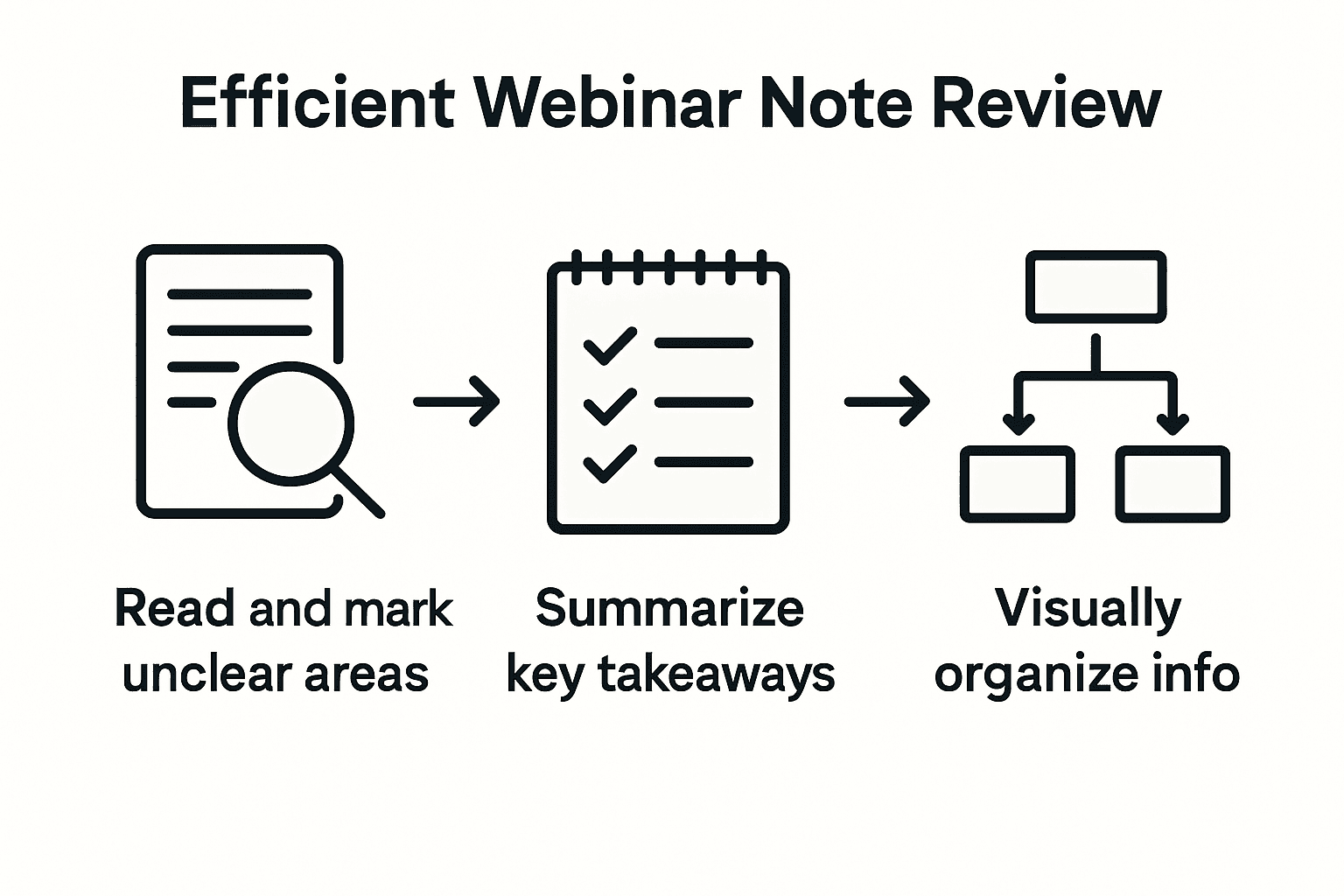
Creating visual representations helps recall complex information more effectively, making your review process more engaging and impactful. Schedule a dedicated review session within 24 hours of the webinar, where you systematically go through your notes. Start by reading through your initial notes with fresh eyes, focusing on identifying any unclear sections or incomplete thoughts. Use different colored pens or digital highlighting to categorize information new insights, questions that need further research, and core concepts that require deeper understanding. Create summary charts or mind maps that visually connect key ideas, transforming linear notes into a more dynamic and interconnected knowledge framework.
Implement a structured refinement process that elevates your notes from raw information to a polished learning resource. After your initial review, rewrite unclear sections using more precise language, fill in missing context, and add explanatory notes that bridge gaps in your understanding. Cross reference your notes with any provided webinar slides or supplementary materials to ensure accuracy and comprehensiveness. Consider adding personal reflections or potential real world applications alongside the core content this practice not only clarifies your notes but also helps embed the learning more deeply in your memory.
Pro tip: Develop a consistent review ritual that includes reading your notes aloud, which can help you identify awkward phrasing and improve overall clarity.
Take Your Webinar Note-Taking to the Next Level with SummYT
Mastering webinar note-taking requires active listening and effective organization yet capturing every key insight during a live session can be overwhelming. The challenge lies in processing complex information quickly while maintaining focus on critical concepts and actionable items. This article highlights practical strategies like real-time summarization and strategic highlighting but even with the best techniques, time constraints and information overload can hold you back.
Why not complement your note-taking skills with powerful AI assistance from SummYT SummYT automatically generates clear, concise summaries and highlights key points from YouTube webinars and lectures so you can save hours of note review and refine your knowledge faster. Whether you want to deepen your understanding through quick follow-ups or reduce stress by skipping repetitive content, SummYT transforms long videos into actionable insights in minutes. Start maximizing your webinar productivity today at SummYT and experience effortless, focused learning with AI-powered summaries.
Frequently Asked Questions
How can I choose the best note-taking tool for webinars?
Selecting the right note-taking tool depends on your personal comfort and learning style. Consider testing a few applications such as Microsoft OneNote or Evernote with free trials to find one that aligns with your preferences and workflows.
What should I include in my webinar note-taking template?
Your webinar note-taking template should have sections for main points, questions, action items, and additional resources. Create a clear structure before the session to facilitate organized note-taking and enhance your overall understanding.
What techniques can improve my active listening during webinars?
Improve your active listening skills by focusing visually on the presentation and using physical cues, like nodding, to engage. Practice summarizing key points in your own words immediately after they are presented to enhance retention and understanding.
How can I effectively highlight important insights in my notes?
Create a color-coded highlighting system to categorize information—for example, use yellow for key concepts and green for examples. This method allows for quick visual referencing and helps you synthesize complex information after the webinar.
What steps should I take to review and refine my webinar notes?
Schedule a review session within 24 hours of the webinar to re-read and clarify your notes. Rewrite unclear sections and fill in gaps, while also creating summary charts or mind maps to connect key ideas for better retention.
How can I transform my notes into a useful resource for future reference?
After a thorough review, write concise summaries for each section that captures main ideas and connections. Consider adding personal reflections or potential applications, allowing your notes to serve as a practical guide for future learning and implementation.